
Frequently Asked Questions
Categories of FAQ
- All
- Workforce Analytics
- Time & Labor Management
- Compensation Benchmarking
- Cannabis
- Benefits Administration
- Wineries
- Payroll
- Towing
- Union
- Agriculture
- Manufacturing
- Hemp and CBD
- Healthcare
- Construction
- Tax Information
- Casinos and Gaming
- Beverage
- BenefitWürks
- Employee Benefits
- Employee Onboarding
- Hiring Software
- HR Management
- Insights and Innovation
- Insurance
- Payroll and Compliance
- Managed Services
- Retirement
- Workforce Management
Workforce Analytics
How does Würkforce Analytics support HR professionals?
The platform gives HR professionals enterprise-level HR and business intelligence tools without needing a separate data team. You can access critical workforce data, build custom reports, and share dashboards with leadership, so you can act quickly on turnover, overtime, and engagement trends and back up your recommendations with data.
Is Würkforce Analytics suitable for small businesses?
Yes. The platform scales to businesses of all sizes, from single-location employers to multi-state operators. Small businesses get the same dashboards and reporting as larger companies, which helps them improve operational efficiency, control labor costs, and make better people decisions without hiring a dedicated analyst.
What is workforce analytics software?
Workforce analytics software collects data from payroll, HR, scheduling, and recruiting systems and turns it into dashboards and reports about your people. It helps leaders track labor costs, turnover, productivity, and engagement, and spot trends before they become problems. Würkforce Analytics does this inside Würk’s HR and payroll platform, so the data is already connected.
What’s the difference between workforce analytics and HR analytics?
The terms overlap. HR analytics usually focuses on HR processes, such as hiring, retention, and engagement. Workforce analytics takes a broader view and connects people data to business results, such as labor costs, overtime, and productivity. Würkforce Analytics covers both, because it draws from payroll and scheduling as well as HR records.
What are the best tools for workforce analytics?
The best workforce analytics tools pull from the systems where your people data already lives, update in real time, and present insights in dashboards that non-analysts can read. Standalone tools often need integrations to get that data. Platforms like Würk, where analytics, payroll, HR, and scheduling share one database, skip that step and keep reports accurate.
What metrics should workforce analytics track?
Common workforce analytics metrics include turnover and retention rates, time to fill, overtime hours, labor cost as a share of revenue, absenteeism, tenure, and pay equity. The right mix depends on your goals. A business with high hourly turnover will focus on retention and scheduling metrics, while a fast-growing company may focus on hiring speed.
How can I connect HR data to business analytics?
Start by getting payroll, HR, scheduling, and recruiting data into one place, either through integrations or a single platform. Then pick a small set of metrics tied to business goals, such as labor cost per location or turnover by manager. Würkforce Analytics handles the first step automatically, because it runs on the same database as Würk’s payroll and HR tools.
Time & Labor Management
How does Würk’s time and attendance software help me stay compliant?
Our system builds labor law rules into scheduling and time tracking, helping you follow break requirements, overtime laws, and industry-specific regulations. Detailed time records by employee, task, and location also give you an accurate history to rely on if you’re ever audited by a state or federal agency.
Why choose Würk for timekeeping and scheduling?
Würk combines scheduling, time tracking, labor reporting, and payroll in one platform designed for compliance-centric businesses. You get accurate time data, fewer manual steps, and a dedicated support team that understands the labor rules your business faces, from overtime calculations to multi-location scheduling.
What is time and attendance software?
Time and attendance software records when employees start and stop work, tracks breaks and time off, and turns that data into payroll-ready timesheets. Würk’s time and attendance software adds employee scheduling and labor cost reporting, and it syncs approved hours directly to payroll so you don’t have to export or re-enter time data.
What is employee scheduling software?
Employee scheduling software helps managers build, publish, and adjust shift schedules. Instead of spreadsheets and group texts, managers work from a shared calendar, and employees see their shifts, swap requests, and changes on their phones. Würk’s scheduling tools also check shifts against break and overtime rules and match employees to open shifts automatically.
What are the benefits of automated time and attendance?
Automated time tracking reduces timesheet errors, buddy punching, and manual data entry. It gives managers real-time visibility into who’s working, flags overtime before it happens, and creates accurate records for audits. When time data syncs directly to payroll, as it does in Würk, you also cut the time spent reconciling hours each pay period.
What’s the best scheduling software for shift-based businesses?
Businesses that run shifts around the clock need scheduling software that handles multiple locations, matches employees to shifts automatically, alerts staff to changes, and connects to payroll. Würk’s scheduling and time tracking are built for shift-heavy, regulated operations, including healthcare facilities, manufacturing plants, casinos, and cannabis dispensaries.
Can time and attendance software integrate with payroll?
Yes. In Würk, time and attendance is part of the same platform as payroll, so approved hours, overtime, and PTO move into payroll automatically. There’s no file export or third-party connector to maintain, which reduces errors and shortens the time it takes to close each pay period.
Compensation Benchmarking
What is compensation benchmarking?
Compensation benchmarking is the process of comparing what you pay employees against what similar employers pay for the same roles. It uses market salary data, matched by job title, level, and location, to show whether your pay is below, at, or above market. Companies use it to set salary ranges, make competitive offers, and reduce turnover.
How does salary benchmarking work?
Salary benchmarking starts by matching your job titles to standardized roles in a compensation dataset. You then compare your pay for each role against market percentiles, adjust for location and experience, and identify where you’re over or under market. Würk’s compensation benchmarking software handles the matching and comparisons for you in one dashboard.
How do I conduct salary benchmarking?
List the roles you want to benchmark and gather current pay data for each. Match every role to a comparable market job based on duties rather than title alone. Pull market pay data for your region and company size, compare your pay to market percentiles, and set target ranges. Repeat the process at least once a year or whenever the market shifts.
What HR software has salary benchmarking data?
Some HR platforms rely on third-party salary surveys, while others build benchmarks from their own payroll data. Würk’s compensation benchmarking software is built into our HR and payroll platform and draws on nearly 2,000 active job titles and 60,000 employees, so you can compare pay without buying a separate survey.
Why is compensation benchmarking important?
Pay is one of the top reasons employees accept offers and leave jobs. Benchmarking shows whether your wages are competitive, helps you avoid overpaying for some roles while underpaying for others, and gives you a defensible basis for pay decisions. It also supports pay equity by applying the same market standard across your workforce.
How is Würk’s compensation benchmarking software different?
Our tool is designed for regulated, compliance-centric industries, where general salary surveys often miss the roles you hire for, from cannabis and healthcare to construction, manufacturing, and alcoholic beverages. It offers real-time data and analytics to help you assess, optimize, and compare your pay structures using industry-specific data instead of generalized benchmarks.
How does compensation benchmarking improve my hiring process?
By using reliable, up-to-date pay and benefits data, our tool helps you craft attractive, fair wage offers that appeal to high-quality candidates, improving your recruitment and retention efforts. Your business depends on its people, and compensation intelligence helps you retain and engage top talent.
Cannabis
What is cannabis HR software and what does it include?
Cannabis HR software centralizes hiring, onboarding, scheduling, time tracking, and payroll for licensed, plant-touching operators. For cannabis specifically, it also handles Internal Revenue Code Section 280E labor tracking, payroll for businesses without bank accounts, multi-entity and common paymaster structures, and state-by-state compliance, which general-purpose HR platforms are not built to do.
How does 280E affect my cannabis business?
Section 280E of the tax code states that no deduction or credit shall be allowed for a business trafficking a controlled substance. It prevents cannabis businesses from claiming standard deductions for business expenses even when they operate as state-legal entities. Würk can help track and optimize labor deductions, which eases part of the burden. Würk strongly recommends working with certified cannabis law, tax, and accounting professionals to manage 280E compliance.
Can Würk run payroll without a bank account or pay employees in cash?
Würk was built for the cannabis industry, including operators without a banking relationship. Businesses can be configured as unbanked in the system, where Würk acts as the payroll calculator and reporting tool rather than the payment mechanism. It calculates wages, taxes, and withholdings and keeps records compliant, the employer pays employees directly in cash, and the employer remits payroll taxes to the tax agencies separately. Automated tax and payroll calculators mean payroll runs accurately whether or not a bank is involved. Cash-heavy operators should also note the IRS requirement to file Form 8300 within 15 days of receiving more than $10,000 in cash.
Is Würk a PEO or a payroll processor?
Würk is a payroll processor, not a professional employer organization (PEO). Clients remain the legal employer of record and keep full control over their workforce, benefits, and employment decisions. Würk does not co-employ workers or take ownership of HR policies. It provides the technology and expertise to run payroll, HR, taxes, and compliance without the co-employment model.
How does Würk handle multi-EIN and common paymaster setups?
Würk supports multi-EIN organizations and IRS-compliant common paymaster arrangements in one centralized platform. Each EIN is configured as its own legal employer for tax filing and reporting, while payroll is managed holistically, which suits businesses with shared employees, parent-subsidiary structures, or a growing entity footprint. For common paymaster setups, Würk tracks wages across participating EINs and applies FICA caps at the employee level, helping prevent duplicate Social Security and Medicare taxation. Employees get one consolidated record and correctly issued tax documents, and finance teams keep EIN-level and consolidated reporting with clean general ledger mapping.
Does Würk integrate with seed-to-sale or POS systems like METRC or Dutchie?
No. Würk does not currently integrate directly with seed-to-sale or point-of-sale systems like Dutchie or METRC. Labor data captured elsewhere can be imported or mapped into payroll, so time, wages, and job or department information line up with payroll records while sales, inventory, and production stay in your existing tools. Würk continues to evaluate integration partners, so more options may become available.
What types of cannabis companies does Würk work with?
Würk works across the licensed supply chain, from single-location dispensaries to multi-state operators, covering cultivation, manufacturing, distribution, and retail. The platform serves businesses from roughly ten employees to enterprises with more than a thousand.
Does Würk support hemp and CBD businesses too?
Yes. Hemp and CBD operators face their own regulatory and payroll requirements, which Würk covers on its dedicated hemp and CBD page. Businesses running both plant-touching cannabis and hemp lines can manage them together, including under separate EINs where the entity structure calls for it.
Benefits Administration
What Does ERISA Stand For?
ERISA stands for the Employee Retirement Income Security Act, the federal law governing most private-sector benefit plans. Among other requirements, the DOL requires plan sponsors to provide a Summary Plan Description explaining how the benefit plan operates and what rights participants have.
What Is COBRA in Benefits Administration?
COBRA is continuation coverage that lets employees and their dependents keep group health coverage after a qualifying event like termination or reduced hours. It generally applies to employers with 20 or more employees and involves specific notice deadlines, election windows, and coverage end dates that HR has to track closely.
What Is the Benefits Administration Process?
Benefits administration is the process of designing, communicating, and maintaining an employer’s full benefit program, from initial plan strategy and eligibility rules through enrollment, payroll syncing, and ongoing compliance reporting. Employee benefit administration runs year-round rather than being limited to the annual enrollment window.
When Should a Small Business Switch to Benefits Administration Software?
A good signal is when manual reconciliation, missed deadlines, or growing multi-location complexity start outpacing what an internal benefits administrator can track by hand. At that point, look for a benefits administration platform with payroll sync, carrier integrations, and built-in regulatory reporting.
How Does Benefits Administration Connect to Payroll?
Employee elections have to translate into accurate deduction codes, effective dates, and pre-tax treatment before the next payroll run. Reconciling this data between HR and payroll systems is what prevents paycheck surprises after enrollment closes.
How Long Do Employees Have to Elect COBRA Coverage?
Qualified beneficiaries generally have 60 days to elect COBRA continuation coverage, counted from whichever comes later: the date of the qualifying event or the date they receive the election notice.
What is benefits administration technology?
It is software that manages employee benefit elections, qualification rules, payroll deductions, and carrier connections in one system. It goes beyond running open enrollment once a year and instead handles benefits-related data and compliance requirements continuously.
What is an EDI 834 feed in benefits administration?
EDI 834 is the standardized electronic file format most insurance carriers require for transmitting enrollment, eligibility, and coverage data. Mismatched plan codes, incorrect dependent relationship codes, and formatting errors are common causes of rejected files, which is why file validation and reject monitoring matter as much as the feed itself.
What does ERISA require of employer-sponsored benefit plans?
ERISA sets standards for employer-sponsored health plans, retirement plans, and other benefits plans and benefits programs, including participant protections, fiduciary duties, and required recordkeeping and disclosure. Employers are generally responsible for distributing summary plan descriptions and other notices on specific timelines, and most plans must file Form 5500 annually.
How does this software support ACA compliance?
It tracks the workforce size and full-time status data needed to determine applicable large employer status, then organizes the coverage offer and affordability records required for annual reporting. This makes it possible to reproduce the data behind IRS Forms 1094-C and 1095-C without a manual reconstruction each filing season.
What questions should HR ask before replacing benefits administration software?
Key questions include which system will serve as the source of truth for employee data, how frequently carrier feeds run, what happens when a record is rejected, and who owns implementation and ongoing support. Ask the provider about SOC 2 Type II reporting as part of security due diligence. Vague answers to these questions during evaluation often signal problems after go-live.
How long does a benefits administration technology migration take?
Timelines vary based on the number of carrier connections, the state of existing data, how much parallel testing is required before go-live, and whether a benefits consulting partner or broker is involved. The ideal benefits administration timeline balances speed with accuracy, and switching enrollment software mid-cycle usually adds complexity rather than removing it.
What Is Employee Benefits Communication?
Employee benefits communication is the process an employer uses to explain benefits to its workforce and to furnish the disclosures ERISA and related rules require. It covers both the enrollment guides and reminders employees notice, and the SPD, SBC, and COBRA notices that carry deadlines whether anyone reads them or not. Würk supports both halves for compliance-centric employers, with the employer as plan sponsor holding the obligation.
What Is a Summary of Material Modification?
A Summary of Material Modification, or SMM, is the notice telling participants that a benefit plan has changed, and it stands in for reissuing the full Summary Plan Description. For a change that reduces covered services or benefits, disclosure is generally due within 60 days of adopting it. For other material changes, the deadline runs to 210 days after the end of the plan year in which the change was adopted.
What Are Some Examples of Benefits Communication?
On the required side: the Summary Plan Description, the Summary of Benefits and Coverage, COBRA general and election notices, the Summary of Material Modification, and the Medicare Part D creditable coverage notice. On the engagement side: enrollment guides, plan comparison tools, decision calculators, one-on-one sessions, life-event prompts, and reminders about benefits employees are paying for and not using. The first list has deadlines and the second one has a cadence.
Wineries
How Far in Advance Should Wineries Start Hiring for Harvest?
Wineries should start recruiting before a labor shortage becomes visible, usually a full season ahead of harvest. Ideally, 4 to 6 months out, which is usually late winter or early spring. High-demand positions like cellar hands and experienced operators book early, while international intern visas (like J-1s) require 3 to 6 months of lead time.
What Makes Hiring For Tasting Room Different From Restaurants?
With wineries, it’s less about turning tables and more about building relationships. Tasting room personnel require specific wine knowledge and storytelling ability in addition to standard hospitality service skills. Their job goes beyond creating a great service memory. They’re trying to build a lasting relationship that converts a guest into a long-term wine club member or recurring online buyer.
Why Do Seasonal Vineyard Workers Not Return the Following Year?
Non-returning seasonal workers usually point back to unclear expectations, payroll confusion, or the simple absence of any proactive rehire outreach. Experienced crews fill their calendars early, so if a vineyard doesn’t check in during the off-season and proactively ask them back, workers simply assume the spot isn’t there and lock in plans with another grower.
What Should Be Included in a Winery Onboarding Checklist?
Clear mandatory paperwork before day one, then cover workplace basics on shift. Get tax forms, direct deposit, and job certifications (like food handler or forklift permits) out of the way early. On their first day, walk through safety protocols, introduce team leads, and outline basic rules like dress code and shift expectations. Getting administrative details done early lets new hires focus on learning the job.
What payroll records must a wine business keep?
A defensible payroll record includes the employing entity and location, agricultural versus non-agricultural duty data, hours, pay rates, tips, deductions, and required filings, retained for the longest period required by any applicable law. Reconciling these records against production logs and point-of-sale data adds supporting evidence if a regulator asks questions later.
Which laws apply to tasting room employees?
Tasting room staff generally fall under standard, non-agricultural wage and hour rules rather than agricultural exemptions, including tip-credit and tip-pool requirements where applicable. Age restrictions and responsible-service training requirements also apply specifically to anyone serving or handling alcohol.
How should wineries manage tipped employees?
Direct tips and mandatory service charges receive different legal treatment, and employers generally must provide notice before taking a tip credit. Tip pools have eligibility rules, managers and supervisors are often restricted from participating, and tip sharing between guest-facing and back-of-house roles needs careful handling.
How often should a winery conduct a payroll and HR audit?
A practical cadence is quarterly review for the highest-risk areas identified in a self-review, such as worker classification and seasonal labor, with at least one full annual pass covering every category. Acquisitions, new tasting rooms, new distribution states, or payroll-system changes are all good triggers for an additional check outside that schedule.
What documents will regulators request during a review?
Expect requests for payroll registers, time records, employment contracts, and TTB production and taxable-removal records, along with housing and transportation documentation if MSPA or H-2A workers are involved. Having these reconcilable across HR, payroll, and production systems in advance is what separates a manageable inquiry from a difficult one.
Payroll
What Is an H-2A Worker?
An H-2A worker is a foreign national admitted to the United States under a temporary visa program for seasonal agricultural labor. Employers take on specific recruitment, housing, and wage obligations that must be documented throughout the worker’s employment.
Towing
Does Würk work for tow companies that pay drivers per job or per hook, not just hourly?
Yes. Our payroll software for trucking companies is built for the unique needs of the towing industry, allowing you to run payroll using custom piece-rate formulas, hook fees, and bonuses alongside standard hourly wages.
Can Würk handle scheduling for a 24/7 on-call rotation?
Absolutely. The platform gives your dispatcher the real-time visibility needed to manage rotating shifts and 24/7 emergency calls while monitoring hours of service to avoid driver fatigue.
How does Würk support compliance with DOT and state licensing requirements?
Würk is a comprehensive payroll software that keeps your business audit-ready. It tracks commercial licenses, medical certifications, and safety records so your team stays fully compliant with local and federal transportation mandates.
Does the mobile app work for drivers who are never in the office?
Yes. The intuitive employee mobile app lets operators log their time, view accurate payroll breakdowns, and check stubs right from their truck, eliminating the need to visit the office or use manual paperwork.
Can Würk manage payroll across multiple states if our trucks cross state lines?
Yes. Würk supports multi-state payroll needs and helps trucking company payroll software stay aligned with tax compliance and reporting requirements across jurisdictions.
We're a small operation. Is Würk built for companies our size?
Würk scales to match your specific business needs. Whether you operate an ambitious small fleet or run a large multi-regional enterprise, our platform is built to eliminate manual errors and help you grow your business.
Union
What is union payroll?
Union payroll covers two distinct operations: compensation the union pays to its officers and employees, including wages, stipends, and reimbursements, and dues deductions that employers collect from members’ paychecks and remit to the union. Each pipeline has separate accounting, tax, and compliance obligations, and conflating them is a common source of LM filing errors.
What does OLMS stand for?
OLMS stands for Office of Labor-Management Standards, the Department of Labor division that administers the LMRDA, reviews annual LM filings, and conducts compliance audits of union financial practices. LM filings are public record, meaning any member, journalist, or regulator can search officer compensation disclosures directly.
What is the difference between lost time and release time?
Lost time is compensation paid by the union to a member for hours spent on union business away from their employer’s job. Release time is when an employer allows a representative to conduct union business during working hours without pay loss, with the employer continuing to pay. Lost time generates a union payroll obligation and requires certified documentation; release time does not, though tracking it still serves the union’s interests.
If audited by OLMS tomorrow, could we produce a clean paper trail for every officer payment in the last three years?
Every officer payment should trace to an authorization, an accounting entry, and a bank record. If reconstructing that chain for any single payment takes more than a few minutes, the recordkeeping system needs work. Running a periodic internal audit simulation, pulling five random officer payments and tracing each through the full documentation chain, identifies gaps while there is still time to address them.
What controls prevent a single person from both processing and approving payroll disbursements?
The core control is segregation of duties: the person who processes payroll should not be the same person who approves it, and neither should be the person who releases the bank transfer. Where headcount is too limited for full segregation, a two-person sign-off requirement at the approval and release steps provides a compensating control. Role-based permissions in the payroll system enforce those controls at the technical level.
Agriculture
Does Würk support multilingual access for non‑English‑speaking workers?
Yes. Würk supports multilingual access to help non‑English‑speaking workers interact more easily with key workforce functions. The platform offers language options for core employee experiences (such as time tracking and employee self‑service) so workers can view and enter information in a language they’re more comfortable with.
Does Würk support workers in multiple states?
Yes! The platform allows employers to configure multiple work locations and tax jurisdictions so earnings, withholdings, and employer taxes are calculated accurately for each state. Würk also supports state‑specific requirements such as new‑hire reporting, wage and hour rules, and final pay obligations, with reporting available by state or rolled up across the organization.
How does Würk handle seasonal farm payroll?
Würk supports seasonal farm payroll by providing flexible payroll and workforce tools designed to handle fluctuating needs throughout the growing and harvest seasons. Employers can onboard and pay seasonal workers efficiently, manage variable schedules and hours, and support multiple pay types (such as hourly or piece‑rate) within the same payroll cycle. Würk helps ensure wages, taxes, and reporting are processed accurately as workforce size changes, while offering visibility into labor costs by role, field, or location. This allows businesses to scale their payroll operations up or down as needed while maintaining consistency, compliance, and clear payroll records during peak seasons.
How long does it take to get set up in Würk?
Würk’s setup timeline varies based on factors like payroll complexity, number of locations, and system setup. That said, most clients are onboarded in a few weeks, not months. Throughout the process, Würk’s implementation team works closely with clients to guide setup, answer questions, and ensure a smooth transition to the platform.
Which ag‑specific tax requirements does Würk support?
Würk supports several agriculture‑specific tax requirements by helping employers configure payroll in line with federal and state rules that commonly apply to agricultural operations. This includes support for FLSA exemptions, such as overtime exemptions where applicable, handling seasonal and migrant worker payroll, and applying the correct withholding and reporting rules for farm labor. Würk also supports accurate tax calculations and filings based on work location, helps manage cash wages where permitted, and maintains clear payroll records to support compliance and audits. While employers remain responsible for determining which ag‑specific rules apply to their operation, Würk provides the payroll tools and structure needed to process payroll accurately and consistently.
How does Würk handle piecework and variable pay rates?
Würk handles piecework and variable pay rates by allowing employers to configure multiple pay types and rates for the same employee based on how work is performed. Piece‑rate earnings can be captured alongside hourly wages, and variable rates can be applied by role, job, department, production line, or location, even within the same pay period. As work is recorded, earnings are calculated accurately and flow through payroll for proper calculation, tax withholding, and reporting. This flexibility helps organizations compensate workers fairly while maintaining consistent, compliant, and audit‑ready payroll records.
Manufacturing
How does Würk help me handle labor shortages?
Labor shortages are an ongoing challenge in manufacturing, especially for skilled, hourly, and shift‑based roles. Würk streamlines recruiting and onboarding to find top talent and get new hires on the floor faster. Our intuitive scheduling tool, self‑service mobile app, and learning resources improve employee engagement and support long‑term retention!
Which parts of HR can Würk handle?
Würk supports the full employee lifecycle in one connected platform. That includes everything from hiring to retiring, payroll, time and attendance, compliance support, reporting dashboards, analytics, and workforce management. By bringing these functions together, HR and operations teams spend less time managing systems and more time supporting the workforce.
Does Würk have a mobile app?
Yes. Würk offers a mobile app designed for both employees and managers. Employees can view schedules, clock in and out, access pay stubs, and manage basic HR tasks from their mobile devices, while managers can stay connected to calendars, time data, and workforce insights, even when they’re not at a desk.
Does HR software need to be customized for manufacturing?
Manufacturing environments come with unique demands like complex schedules, overtime rules, safety training, and compliance requirements. HR software built for office‑only work often falls short on the production floor. Würk is designed to support these realities, helping manufacturers manage their workforce accurately and consistently across shifts, locations, and roles.
What can Würk automate for manufacturing HR?
Würk automates many of the most time‑consuming human resource tasks, including time tracking, payroll calculations, tax withholdings, onboarding workflows, and reporting. Automation reduces manual effort and errors, helps ensure employees are paid correctly, and gives HR and operations teams more confidence in their data.
Can Würk manage piece-rate pay in addition to hourly?
Yes, employers can compensate workers based on production output while still ensuring accurate payroll processing. The platform supports multiple pay types for a single employee, so piece‑rate earnings can be captured and paid in addition to hourly time worked within the same pay period.
How does Würk handle union payroll and CBA requirements?
Würk supports union payroll and collective bargaining agreement (CBA) requirements by allowing employers to configure payroll rules that align with negotiated union terms. This includes setting up CBA‑specific wage rates, job classifications, overtime rules, shift differentials, and union deductions, as well as managing employees who may fall under different agreements. As time and earnings are captured, pay is calculated according to the applicable CBA rules, with reporting and records available to support audits and compliance reviews.
Can Würk handle labor cost allocation by production line or facility?
Yes, by allowing employers to assign time and earnings to specific facilities, production lines, departments, or cost centers. As employees record time, hours, and wages can be attributed to the appropriate operational area, even when work spans multiple lines or facilities within the same pay period.
How does Würk support multi-state compliance for manufacturers with multiple plants?
Würk supports multi‑state compliance for manufacturers with multiple plants by helping centralize payroll and workforce management while applying the correct state and local rules at each location. The platform allows employers to configure plant‑specific locations, tax jurisdictions, and labor rules so wages, withholdings, and employer taxes are calculated based on where work is performed. Würk also supports tracking state‑specific requirements such as new‑hire reporting, wage and hour rules, and final pay obligations, with reporting that can be viewed by plant or rolled up across the organization. This approach helps multi‑plant manufacturers maintain compliance across state lines while keeping payroll operations consistent, accurate, and scalable as the business grows.
What is manufacturing HR software and what does it include?
Manufacturing HR software centralizes hiring, onboarding, scheduling, time tracking, and payroll for workforces spread across shifts, lines, and facilities. For manufacturers, it also handles shift differentials, piece-rate pay, union and collective bargaining agreement (CBA) rules, labor cost allocation by line or cost center, and safety certification tracking, which general-purpose HR tools built for office teams often handle poorly.
How does Würk handle piece-rate pay and union payroll requirements?
Würk supports multiple pay types for the same employee in one pay period, so piece-rate earnings and hourly wages can be captured and paid together without manual reconciliation. For union crews, employers can configure CBA wage rates, job classifications, overtime rules, shift differentials, and union deductions, including employees who fall under different agreements. As time and earnings are captured, pay calculates according to the applicable CBA rules, with reporting and records available to support audits and compliance reviews
Can Würk allocate labor costs by production line, plant, or cost center?
Yes. Würk lets employers assign time and earnings to specific facilities, production lines, departments, or cost centers. As employees record time, hours and wages can be attributed to the appropriate operational area, even when work spans multiple lines or facilities within the same pay period, while still rolling up for payroll and reporting.
How does Würk support multi-state compliance for multi-plant manufacturers?
Würk helps centralize payroll and workforce management while applying the correct state and local rules at each location. Employers can configure plant-specific locations, tax jurisdictions, and labor rules so wages, withholdings, and employer taxes are calculated based on where work is performed. Würk also supports tracking state-specific requirements such as new-hire reporting, wage and hour rules, and final pay obligations, with reporting that can be viewed by plant or rolled up across the organization.
How does Würk handle safety certification tracking and OSHA compliance?
Würk stores completion records for required safety training, certifications, and OSHA credentials in one central hub, with notifications and alerts ahead of expirations. Centralizing those records is designed to help manufacturers keep workers properly qualified and stay audit-ready rather than reconstructing paperwork under deadline.
How does Würk help manufacturers compete for skilled workers?
Applicant tracking speeds up sourcing, screening, and onboarding so open roles get filled faster. That matters in a market where Deloitte and The Manufacturing Institute project as many as 3.8 million manufacturing workers could be needed by 2033, with 1.9 million of those roles at risk of going unfilled if the skills and applicant gaps are not addressed. Quit rates have actually cooled, averaging 2.2% in manufacturing in 2025 versus 3.0% in 2021 according to BLS, so for most manufacturers the harder problem is filling roles rather than holding onto people. Würk supports both, with faster hiring workflows plus the scheduling tools, self-service mobile app, and learning resources that support long-term retention.
Hemp and CBD
How does Würk help hemp and CBD companies overcome the challenges of paying their employees?
You’re not a cannabis business, but being cannabis‑adjacent often means you’re treated like one. Many legal hemp and CBD companies still experience banking friction and payroll provider hesitation, labeled “high risk” despite operating fully within the law. That can make something as basic as paying your employees or running day‑to‑day operations more complicated than it should be. On top of that, your operations may span agriculture, manufacturing, lab environments, ecommerce, and fulfillment, each with its own wage rules, overtime requirements, and safety training obligations. And when you cross state lines, complexity grows exponentially. Würk was originally built for cannabis businesses, which means we understand exactly where hemp and CBD companies do (and don’t) fit. We know the scrutiny you face, and we’re built to support you through it.
How do you handle seasonal hires or high turnover?
Seasonal labor is common in hemp, especially during planting, harvest, and production spikes. Würk makes it easy to quickly onboard, pay, and offboard workers without disrupting payroll or compliance. Automated workflows and configurable pay rules reduce manual effort during peak seasons, and accurate records are maintained even after seasonal staff exit. When workers return, their information is already on file, making rehiring faster, smoother, and far less administrative work.
Can we control access by department?
Yes! Würk supports role‑based access so employees and managers only see what they need. Payroll, tax, and sensitive employee data can be limited to HR or finance, while supervisors manage time and schedules. This helps protect data, reduce errors, and maintain internal controls as teams grow.
What happens when regulations change?
Regulatory change is part of everyday life in the hemp and CBD industry. Würk is built with that in mind, supporting labor and payroll requirements at the federal, state, and local levels while automating tax updates and compliance rules where possible. Your records stay organized and audit‑ready, making inspections, certifications, or financial reviews easier to manage. Instead of relying on last‑minute fixes when rules change, your processes stay intact. With Würk, you’re using a system designed to handle that reality from day one, not retrofitting a platform that was never built for it.
Why choose Würk over a more general HR software provider?
Did you know the average cannabis company risks being dropped by a mainstream payroll provider more than twice over its lifetime? While CBD and hemp businesses aren’t cannabis, they’re often viewed through a similar risk lens by banks and payroll providers, which can lead to unexpected disruptions. We understand your industry and won’t walk away when things get complicated. That means a long‑term partner, not a temporary workaround.
Healthcare
Can Würk track staff credentials and alert me before a license expires?
Yes. Würk’s learning management tools track and store completion of required licenses and certifications, send notifications for expiring certifications, and securely store documents, training, and employee records in one place, so credential status is visible before it becomes a coverage problem.
How does Würk handle shift differentials for nurses and clinical staff?
Würk allows employers to configure pay rules based on specific shifts, schedules, or working conditions. Differential rates can be applied for evenings, nights, weekends, holidays, or other qualifying shifts. As time is captured, the appropriate differential is applied to those hours, which helps organizations meet policy or contract requirements while giving employees and payroll teams clear visibility into earnings.
Does Würk support on-call and per diem pay structures?
Yes. Employers can configure pay rules for on-call shifts, including flat rates, hourly premiums, or additional earnings when a worker is called in. Per diem employees can be set up with flexible schedules and pay types that reflect their as-needed arrangements, and those earnings flow through payroll for wage calculation, tax withholding, and reporting.
Can Würk manage float staff who work across departments with different pay rates?
Yes. Employees can be associated with multiple departments, roles, or positions, each with its own wage rate, so hours worked in different departments during the same pay period are paid at the correct rate. That lets multi-department organizations staff dynamically while keeping pay aligned to where and how the work was performed.
How does Würk handle ACA compliance and reporting?
Würk enables organizations to monitor employee hours, identify ACA eligibility for full-time and variable-hour employees, and apply measurement and stability periods as needed. Würk also supports preparation of ACA reporting data for Forms 1094-C and 1095-C, helping ensure required information is captured accurately and consistently.
How does Würk support staffing ratio visibility for healthcare facilities?
Würk provides visibility into workforce data and labor allocation, which helps organizations monitor staffing levels against internal policies and regulatory requirements. Employers can track hours worked, roles, departments, and locations in near real time, and use reports and dashboards to spot coverage gaps before they become problems.
What is healthcare HR software and what does it include?
Healthcare HR software centralizes hiring, credentialing, scheduling, time tracking, and payroll for clinical and support staff working around the clock. For healthcare specifically, it also handles shift differentials, on-call and per diem pay, float staff working across departments at different rates, license and certification tracking, and Affordable Care Act (ACA) eligibility and reporting, which general-purpose HR tools handle poorly. Buyers in regulated care settings also weigh how a platform stores employee records and controls access to them, including anything touching the Health Insurance Portability and Accountability Act (HIPAA).
How does Würk help healthcare organizations hire and keep staff?
Würk supports recruiting, onboarding, and retention with anytime, anywhere recruitment tools, self-service and mobile access for employees, and dashboards for HR teams. The pressure is not easing: BLS projects health care and social assistance will add more than 2.2 million jobs from 2025 to 2035, roughly 37% of all new jobs in the economy. Quit rates have actually cooled, averaging 2.0% in health care and social assistance in 2025 versus 2.6% in 2022 according to BLS, so for most organizations the binding constraint is filling roles rather than losing people.
Construction
How Does Union Reporting Differ From Standard Payroll Compliance?
Standard payroll tracks one rate per employee. Union reporting tracks rates by trade, local, and fund (often for the same person within the same week) which is exactly why manual spreadsheets tend to break down once reporting volume increases.
What is regrettable turnover?
This term refers to the departure of high-performing or hard-to-replace employees, distinct from planned structural departures tied to project completion or workforce reduction. Tracking it separately helps prioritize retention efforts toward the departures that actually hurt the business.
Why is construction attrition higher than other industries?
Construction’s elevated attrition comes primarily from project cycling and layoffs rather than voluntary quits. Its 2025 layoffs and discharges rate of 2.1% was nearly double the total private sector’s 1.2%, while its voluntary quits rate was actually lower than the broader private sector average.
What is considered a good turnover rate in construction?
There’s no single universal target, since construction spans residential, commercial, and heavy civil work with very different labor models. A segmented figure by trade, tenure, and project is more useful than chasing one companywide number against a national average.
How do you calculate turnover for a construction company?
Divide the number of separations during a period by the mean employee headcount, then multiply by 100. State whether temporary layoffs and recalls are included, and count internal transfers separately so they don’t inflate the figure.
What is the difference between voluntary and involuntary turnover?
Voluntary departures cover resignations and job abandonment, initiated by the employee. Involuntary departures cover layoffs and terminations, initiated by the employer. Separating the two matters because they call for different responses; a high voluntary rate points to pay, culture, or management issues, while a high involuntary rate often reflects project cycling
What is the average turnover rate in construction?
The Bureau of Labor Statistics reported a 4.0% monthly total separations figure for construction in 2025, including a 1.8% voluntary quits rate. This is a monthly rate, not a direct annual percentage, so it shouldn’t be compared to a company’s annual attrition figure without adjustment.
Can Würk Support Prevailing Wage and Government Project Requirements?
Applicant tracking speeds up sourcing, screening, and onboarding in a labor market where qualified crews are hard to come by and harder to keep. Beyond hiring, Würk’s talent development tools support the kind of ongoing training and career growth that keeps skilled workers from walking to a competitor.
How Does Würk Improve OSHA Compliance and Safety Certification Tracking?
Würk tracks and stores completion of required safety certifications and training, including OSHA credentials, with alerts for upcoming expirations. That matters given the stakes: construction and extraction workers accounted for 1,032 fatalities in 2024, according to the BLS Census of Fatal Occupational Injuries, more than any other occupational category. Centralizing certification records helps employers keep crews properly qualified and stay audit-ready.
Is Würk Built for Multiple Job Sites, Including Job Costing and Mobile Access?
Yes. Würk allows employers to assign time, wages, and labor expenses to specific jobs, projects, or cost codes as crews move between sites, so labor costs stay accurate at a granular level while still rolling up cleanly for payroll. Field workers can clock in and out from their phones, and geo-fencing ensures punches are only accepted within approved job site boundaries.
How Does Würk Handle Construction Payroll, Including Union and Prevailing Wage Requirements?
Würk processes pay runs across multiple states and locations while supporting prevailing wage rates, union wage rates, and fringe benefits for Davis-Bacon projects. For union crews, the platform can be configured to reflect CBA-specific wage rates, job classifications, overtime rules, shift differentials, and union deductions, and it maintains the reporting and recordkeeping needed for both certified payroll and CBA audits.
What Is Construction HR Software and What Does It Usually Include?
Construction HR software centralizes hiring, onboarding, scheduling, time tracking, and payroll for crews working across multiple job sites. For construction specifically, it typically also includes certified payroll reporting, prevailing wage tracking, and OSHA credential management, since those are requirements general-purpose HR tools don’t handle well.
Does Davis-Bacon Apply to My Project?
Yes, if the project is federally funded or federally assisted construction. State prevailing wage laws can add separate rules on top of that. Contractors should confirm applicability against the contract clauses and wage determination before work begins.
What are the biggest HR challenges in the construction industry?
The core HR challenges in construction are a structural skilled labor shortage, high turnover driven by foreman quality and pay compression, payroll complexity that generic systems cannot handle, safety compliance documentation that must survive OSHA inspection, and managing a mobile workforce without the office infrastructure most HR tools assume.
How Long Must Certified Payroll Records Be Kept?
Federal regulations require certified payrolls and related records to be kept for three years after all work on the prime contract is completed. State law or specific contract terms can extend that requirement further.
What Counts as a Bona Fide Fringe Benefit?
A bona fide fringe benefit includes health, welfare, pension, vacation, apprenticeship, and training contributions that are documented and tied to an eligible plan. Cash payments in place of benefits count too, but only when treated consistently.
What Is Form WH-347 Used For?
The Form WH-347 documents weekly payroll activity on covered federal or federally assisted construction projects. It includes a signed Statement of Compliance that puts direct accountability on the signer for the accuracy of the submission.
What Is Certified Payroll?
Certified payroll is a weekly payroll record that covered contractors submit on Davis-Bacon projects, showing hours, classification, and wages for each worker. It is typically filed using Form WH-347 or an equivalent format.
What is a bona fide fringe benefit under Davis-Bacon?
A bona fide fringe benefit is a contribution that meets DOL criteria under 29 CFR Part 5: it must be paid irrevocably to a qualifying third-party trustee or insurer, provided under a written plan communicated to workers, and made pursuant to an enforceable commitment. Contributions that don’t meet these requirements cannot be counted toward the prevailing wage fringe obligation and must be made up in cash wages.
Can fringe benefits satisfy overtime obligations?
No. The fringe portion of prevailing wage pay is a straight-time obligation that applies to every covered hour worked. The overtime premium applies to the base hourly rate only. A worker at a $42.00 base rate with an $18.50 fringe obligation earns $63.00 in base wages for overtime hours plus $18.50 in fringe, not 1.5 times the full $60.50 package.
What is cash-in-lieu of benefits?
Cash-in-lieu is when an employer pays the fringe benefit rate directly to the worker as additional cash wages instead of contributing to a qualifying benefit plan. It is permitted under Davis-Bacon but is fully taxable, increasing the worker’s gross wages and the employer’s payroll tax, workers’ compensation, and unemployment insurance costs.
What does Davis-Bacon require?
The Davis-Bacon Act requires contractors and subcontractors on covered federal and federally assisted construction projects to pay workers the locally prevailing wage, which includes both a base hourly rate and a fringe benefits rate. Both components are specified in a wage determination published by the DOL’s Wage and Hour Division and must be paid for every covered hour worked at the site of work.
What is fringe pay?
Fringe pay is non-wage compensation provided on top of a worker’s base hourly rate. In construction, it typically includes health insurance, retirement contributions, and paid time off. On prevailing wage projects, fringe pay refers specifically to the mandatory hourly fringe rate specified in a wage determination, which contractors can satisfy through bona fide benefit contributions, cash paid directly to the worker, or a combination of both
How do you manage a mobile construction workforce with HR software?
Managing a mobile construction workforce requires HR software built for workers without desks. The core capabilities that matter are GPS-verified mobile time capture with job cost code allocation, digital enrollment and document signing accessible from a phone, mobile access to pay statements and HR documents without requiring a desktop login, and safety certification tracking with expiration alerts. Würk’s construction HR platform delivers these capabilities as part of an integrated system, not as add-ons to a platform built for office workers.
What compliance requirements do construction HR teams face?
Construction HR teams manage compliance obligations across several distinct regulatory frameworks. For HR professionals operating in this space, the list is not theoretical:
- FLSA and wage-and-hour: overtime calculations covering travel time, standby time, and show-up time as governed by DOL guidance
- Davis-Bacon and prevailing wage: classification, fringe benefit, apprentice ratio, and certified payroll reporting requirements on federal and state public works contracts
- I-9 and employment eligibility: verification, re-verification, and records retention per USCIS requirements
- OSHA recordkeeping: injury and illness recordkeeping under 29 CFR Part 1904, plus training documentation for specific hazard types
Worker classification: independent contractor vs. employee determinations under IRS and DOL standards
How do construction companies reduce turnover?
Turnover reduction in construction requires fixing the right problem. Competitive pay matters, but it rarely closes the gap alone. The factors with the strongest impact are consistent hiring processes that set accurate expectations before day one, foreman quality and conduct (which is often the real reason workers leave), clear skill-based progression ladders with documented pay step increases, and a first paycheck that is accurate. Construction companies that run stay interviews at 90 days and one year surface flight risk early enough to act on it.
Tax Information
How do I access my W2 as a terminated employee?
You will be receiving a printed copy of you W2 to the address you had on file in Wurk. All W2s will be postmarked and mailed by January 31st. If you would like to receive a digital version of your W2, please reach out to your company admin to unlock your account or provide a digital copy.
How do I review my employee W2s as an admin?
START HERE
1. From the Main Menu, go to Team>HR > Forms > Government Forms > W2s.
Filter and adjust the report to show the data you need.
2. Click the checkboxes next to the employees whose W2s you want to review
3. Click DOWNLOAD.
4. Choose the type of document you want and then click DOWNLOAD PDF. and choose where you want to save the files.
To print many employee W2s at once, select them using the checkboxes on the left and then click DOWNLOAD. Once you save them to your computer, you can print them.
How do I access my W2 as an active employee?
To access your forms, please follow the instructions below.
START HERE
1. Start by navigating to your hamburger menu on the left side of your screen.
2. Under My Info Tab –> Click on My Pay
3. Click on Forms
4. Click on W2.
Note: For each year you worked for your current employer, you will see a row with your W2 information. These values are calculated based on your tax withholding, deductions, and pay over that year.
5. Click the icon next to the year for which you need the W2 form to DOWNLOAD PDF and save the file to your computer or tablet. From there, you can print your W2 for your taxes, etc.
Which accounting platforms does Würk integrate with?
Würk supports a wide range of financial management software. Our primary native integrations include:
- Oracle NetSuite
- QuickBooks Online
- Sage Intacct
Does Würk support automated General Ledger (GL) syncing?
Yes. Through Würk’s API-based integrations, payroll data and journal entries can be automatically pushed to your accounting software. This eliminates manual data entry and reduces the risk of reconciliation errors.
Which state do you pay taxes in for remote employees?
The default rule is that income tax is owed in the state where the work is physically performed. A remote employee working from home in Colorado owes Colorado state tax obligations on those wages, even if the business is headquartered in Illinois. Two exceptions matter most: reciprocity agreements can shift withholding to the employee’s home state, and convenience-of-employer rules in states like New York, Pennsylvania, and Delaware can source wages to the employer’s state even for fully remote employees.
What triggers employer registration in a new state?
Hiring the first employee who works in a new state creates a payroll nexus requiring the employer to register for income tax withholding and SUI accounts before the first paycheck is issued. Temporary project assignments trigger the same obligation even when the presence is not permanent. Registration requirements apply separately to withholding, SUI, and tax jurisdictions; opening one account does not satisfy the others.
Casinos and Gaming
Can Würk track gaming license renewals and responsible gambling training?
Our learning management systems track and store completion of any required safety certification or training. Additionally, set up alerts for expiring certifications or licenses, and securely store records in one centralized place to keep you audit-ready year-round.
Is Würk scalable for multi-property casino groups?
We’re built to scale with multi-site management, integrated payroll, and consolidated HR reporting! Würk grows with your business, so you never outgrow the solution.
Does Würk support 24/7 shift scheduling for casinos?
Our smart scheduling tools are purpose‑built for 24/7 operations, helping you manage overtime, breaks, shift differentials, and full‑ and part‑time work schedules so you can optimize labor costs.
How does Würk help reduce turnover in the gaming industry?
Würk makes it easy to attract, screen, and onboard qualified candidates quickly, enhancing the hiring experience for both employers and employees. Keep your team engaged with robust benefit offerings and easy-to-use tools to support ongoing upskilling.
How does Würk manage payroll for tribal casinos vs. commercial casinos?
Würk supports payroll for both tribal casinos and commercial casinos by accommodating the distinct regulatory, tax, and reporting requirements that apply to each operating model. For tribal casinos, Würk can be configured to reflect tribal sovereignty considerations, including unique tax treatments, reporting structures, and employment rules where applicable, while still supporting compliant payroll processing and clear recordkeeping. For commercial casinos, Würk applies standard federal, state, and local payroll tax and labor requirements based on jurisdiction.
Does Würk integrate with gaming floor management or POS systems?
Würk does not currently offer direct integrations with gaming floor management or casino POS systems. However, the platform is designed to work alongside those systems by allowing labor and workforce data (such as hours, roles, departments, or locations) to be aligned with payroll for accurate pay processing and reporting. This enables casino operators to continue using their existing floor or POS technology while maintaining a centralized, compliant payroll and workforce management system. Würk also continuously evaluates and adds integrated partners, so additional integration options may become available in the future as client needs and technology evolve!
How does Würk handle background check requirements tied to gaming license applications?
Würk supports background check requirements tied to gaming license applications through its partnership with National Crime Search, enabling employers to initiate and manage background screening as part of the workforce process. This allows casino operators to track background check status, clearance, and documentation for employees who require licensing or regulatory approval.
How does Würk manage conflict-of-interest disclosures required by gaming commissions?
Würk provides tools that allow employers to collect, track, and document employee disclosures in a centralized system. Organizations can record required attestations, acknowledgments, and disclosure statuses tied to specific roles or licensing requirements, making it easier to confirm compliance during onboarding and throughout employment.
Beverage
What documents will regulators request during a review?
Expect requests for payroll registers, time records, employment contracts, and TTB production and taxable-removal records, along with housing and transportation documentation if MSPA or H-2A workers are involved. Having these reconcilable across HR, payroll, and production systems in advance is what separates a manageable inquiry from a difficult one.
What is alcohol industry HR software and what does it include?
Alcohol industry HR software centralizes hiring, scheduling, time tracking, and payroll for wineries, breweries, distilleries, bars, and beverage retailers. Producers use it for seasonal crews, piecework, and Alcohol and Tobacco Tax and Trade Bureau (TTB) recordkeeping. On-premise and retail operators use it for tipped wages, tip pooling under the Fair Labor Standards Act (FLSA), and alcohol service certification tracking.
How does Würk handle payroll across production, tasting room, and retail staff?
A single business often runs several pay regimes at once. A winery may have vineyard crews, cellar staff, and a tasting room; a brewery may have a production floor, a taproom, and a retail shop. Würk lets employers configure pay rules by job type, location, and worker classification, so each group is paid under its own rules inside the same pay period. Classification is the employer’s determination and worth confirming with counsel. In California, for example, agricultural overtime finished phasing in on January 1, 2025 and now applies at 8 hours daily and 40 weekly for all employer sizes, with double time after 12 hours, according to the California Department of Industrial Relations.
Can Würk manage seasonal crews during harvest, brewing, and bottling peaks?
Yes. Würk offers rapid hiring, streamlined onboarding, and flexible scheduling so wineries, breweries, and distilleries can scale crews up for harvest, brewing runs, or bottling and back down afterward. Returning seasonal workers move through the same onboarding and certification workflows each year, so records stay consistent season to season.
Does Würk support H-2A and contract labor alongside hourly employees?
Yes. Würk processes payroll for hourly employees, seasonal crews, H-2A workers, and contract labor in one system, with guided tools for H-2A hiring, contracts, and documentation. Seasonal agricultural labor is not a niche concern: the Department of Labor certified 254,688 H-2A positions in the first half of fiscal 2026. Würk also supports flexible payment options including direct deposit, paycards, and paper checks, which matters for crews without bank accounts.
How does Würk handle tipped pay and tip pooling in taprooms and bars?
Würk tracks reported tips, applies tip credits where allowed, and checks that total pay meets minimum wage. The federal tipped cash wage is $2.13 an hour, with employers able to claim up to a $5.12 tip credit against the $7.25 federal minimum wage, according to the Department of Labor, and the employer covers the gap when tips fall short. For tip pools, employers configure eligible roles, distribution methods, and pay periods so tips are allocated consistently, with tipped earnings flowing into wage, tax, and reporting calculations.
Does Würk integrate with POS systems to sync tip data into payroll?
No. Würk does not currently integrate directly with point-of-sale (POS) systems to sync tip data automatically. Tip information captured in a POS can be imported or aligned with payroll so cash and charged tips are recorded accurately for wage calculations, tax withholding, and reporting, which lets operators keep the POS they already use. Würk continues to evaluate integration partners, so direct POS integrations may become available.
Does Würk track ServSafe, Responsible Server, and OSHA certifications?
Yes. Würk’s learning management tools track and store completion of any required safety certification and training, including alcohol service credentials. Employers get notifications for expiring certifications and can securely store documents, training, and employee records in one centralized place.
Does Würk support TTB recordkeeping and state licensing across multiple sites?
Würk helps wineries, breweries, distilleries, and retailers by tracking employee certifications, storing licensing requirements, and maintaining audit-ready records. For multi-site operators, including liquor stores and retail chains, the same tools cover local labor and licensing obligations, with reporting available by location or consolidated across the business.
How does Würk help reduce turnover in the alcohol industry?
Applicant tracking makes it easier to attract, screen, and onboard qualified candidates quickly, which shortens time-to-hire. The on-premise side carries the heaviest churn: accommodation and food services averaged a 4.2% quit rate in 2025, nearly double the 2.2% private industry average, according to BLS. Accurate pay, predictable schedules, and mobile self-service address the part of that an employer can control.
BenefitWürks
What is benefits enrollment automation software?
Benefits enrollment automation software moves employee benefit elections from your HR or payroll system to insurance carriers without manual work. It captures enrollments from new hires, open enrollment, and life events, then sends the changes to each carrier in the format it requires. BenefitWürks does this inside Würk’s payroll platform, so deductions and coverage stay in sync.
Can I automate benefits enrollment?
Yes. With BenefitWürks, employees make their elections in Würk’s self-service portal, and those changes flow to your carriers through automated data feeds. You no longer need to download enrollment reports, reformat them, and upload them to each carrier’s portal. Payroll deductions update at the same time, so there’s no gap between coverage and pay.
What is an EDI 834 file?
An EDI 834 file is the standard electronic format used to send benefits enrollment data from employers to insurance carriers. It includes employee and dependent details, plan selections, coverage dates, and changes. BenefitWürks builds and sends EDI feeds, including 834 files, in each carrier’s required format, so your team doesn’t have to create or upload them by hand.
What happens if benefits enrollment data is delayed?
Late or inaccurate enrollment data can leave employees without active coverage when they need care, create billing discrepancies with carriers, and lead to mismatched payroll deductions. Fixing those issues takes HR time and can hurt employee trust. Automated carrier feeds reduce that risk by sending changes on a regular schedule, usually weekly, instead of relying on manual uploads.
Which carriers and payroll providers are supported?
BenefitWürks supports all major insurance carriers, payroll providers, and benefits brokers. That includes health, dental, vision, life, and disability plans, plus COBRA, retirement plans, FSAs, and more. If you work with a regional or specialty carrier, our team will confirm its file requirements during setup and build the feed to match.
What do carriers need to set up an integration?
Carriers typically need an EDI contact, your account structure, group and policy numbers, their file specifications, and SFTP connection details. You’ll submit this information through a simple request form for each carrier. Würk’s team then handles the build, testing, and move to production, and keeps you updated at each step.
How does BenefitWürks reduce errors?
BenefitWürks replaces manual file uploads with automated data feeds that pull directly from your payroll and HR records. Because nothing is re-keyed, there are fewer typos and missed changes. Each feed is tested with real employee data before it goes live, and carrier feedback is used to fix mapping issues before your first production file.
Employee Benefits
What is Cannabis Employee Benefits Software?
How does this software help manage payroll challenges in the cannabis industry?
Can this software integrate with my HR and payroll system?
How does Würk ensure security compliance?
Why choose Würk for cannabis workforce management?
What Counts as Proof That an Employee Received a Required Notice?
The regulatory standard is measures reasonably calculated to ensure actual receipt, which is about how a document was delivered rather than whether it was available somewhere. For electronic delivery, the rules point to return-receipt features, notification of undelivered mail, and periodic reviews or surveys confirming receipt. Posting material in a place employees frequent is specifically not enough on its own.
Employee Onboarding
What is employee onboarding software?
Employee onboarding software automates the process of bringing a new hire into your organization. It handles paperwork like tax and direct deposit forms, assigns role-based training and tasks, and tracks progress so HR and managers can see what’s left. Würk’s onboarding software also connects to recruiting, HR, and payroll, so new hire data only gets entered once.
Can onboarding software integrate with HR and payroll systems?
Yes. Würk’s onboarding software is part of an all-in-one HR and payroll platform, so there’s no separate integration to manage. When a new hire completes their forms, their tax, direct deposit, and benefits information moves into payroll and HR records automatically, which cuts down on manual entry and errors.
Why choose Würk for employee onboarding?
Würk offers role-based onboarding workflows inside an all-in-one HR and payroll platform built for compliance-centric businesses. You get preboarding, checklists, reminders, and manager visibility, plus a dedicated support team that knows the hiring and record-keeping requirements in industries like cannabis, healthcare, construction, and manufacturing.
How do I automate employee onboarding?
Start by mapping every step a new hire completes, from offer acceptance through their first 90 days. Then turn those steps into role-based checklists with electronic forms, automated reminders, and manager tasks. With Würk, onboarding starts when a candidate is marked hired in the applicant tracking system, and completed forms flow straight into payroll and HR records.
How does onboarding software improve employee retention?
New hires who get a clear, organized first few weeks are more likely to stay. Onboarding software helps by making sure paperwork is done before day one, training is assigned on time, and managers check in at set milestones. That structure reduces early confusion and gives new employees a faster path to feeling productive and connected to the team.
How long should employee onboarding take?
Most onboarding programs cover the first 30 to 90 days, though paperwork and system setup should be finished before or on day one. Onboarding software helps by front-loading forms during preboarding, then pacing training and check-ins across the rest of the period so new hires aren’t overwhelmed in their first week.
What should an employee onboarding checklist include?
A strong checklist covers paperwork such as I-9, W-4, and direct deposit forms; equipment and system access; required compliance training; role-specific training; team introductions; and scheduled manager check-ins. Würk lets you build a different checklist for each role, so a warehouse associate and a nurse each get only the steps that apply to them.
Hiring Software
What is an applicant tracking system?
An applicant tracking system, or ATS, is software that manages hiring from job posting to offer. It collects applications, screens candidates, schedules interviews, and tracks each person’s status so recruiters and hiring managers work from one shared view. Würk’s ATS also connects to onboarding, HR, and payroll, so hiring data carries through to the employee record.
How do I choose an applicant tracking system?
Start with your hiring volume, the job boards you rely on, and your compliance needs, such as background checks and record-keeping. Then look at how the ATS handles what happens after the offer. A system that connects to onboarding and payroll, like Würk’s, saves the most time because new hire information doesn’t need to be entered twice.
Which applicant tracking systems integrate with payroll?
Many standalone ATS tools need a third-party integration to pass new hire data to payroll. Würk’s applicant tracking system is built into the same platform as payroll, HR, and benefits, so there’s no integration to set up or maintain. When a candidate is hired, their information moves straight into onboarding and payroll.
What questions should I ask an applicant tracking system vendor?
Ask how the ATS posts to job boards, whether background checks are built in, how it stores documents for audits, and what the candidate experience looks like on mobile. Then ask what happens after the offer: does new hire data flow into onboarding and payroll automatically, or will your team re-enter it by hand?
Can an applicant tracking system run background checks?
Yes. Würk’s ATS gives you access to background checks inside the hiring workflow, so you can order a check, review results, and keep a record in the candidate’s file without switching systems. That record-keeping helps employers in regulated industries, such as healthcare, cannabis, and alcoholic and beverage, meet their hiring requirements.
How does Würk’s recruiting software help my hiring team?
Würk’s recruiting software connects to popular job boards like Indeed, so your postings reach a wide audience. It also includes proactive candidate sourcing, flexible online application forms, and options for internal and external postings. Interviewers leave feedback in one place, which helps your team compare candidates and improve your hiring process over time.
How does Würk compare to other recruiting platforms?
Unlike general-purpose recruiting tools, Würk is built for compliance-centric businesses and lives inside a unified HR and payroll platform, so there’s no separate integration to manage. Candidate sourcing, hiring, onboarding, and payroll all run in one place, backed by a dedicated support team that knows the hiring rules regulated employers face.
HR Management
What is Human Resources Management Software?
How does Würk’s HR solution help cannabis businesses stay compliant?
Can this software integrate with payroll and workforce management systems?
How does Würk improve employee engagement?
Why choose Würk for cannabis HR management?
What is the cost of Würk's solutions and services?
To determine which of Würk’s many solutions and services are the best fit for your organization, please reach out to info@enjoywurk.com to speak to a member of our sales team! They will reach out ASAP to schedule a quick 15-minute chat.
How do I reset my employee password or unlock my account?
These instructions guide you in resetting an Employee password on systems upgraded to the latest Wurk release.
Some options shown in these instructions might not match your permissions and setup.
START HERE
1. From the Main Menu, search for Reset and select Password Reset (or navigate to Team>HR>Employee Maintenance>Password Reset).
2. Find and select your employee(s) using the search  icon next to the Employee field, and when the popup window appears, search by Badge number, employee ID, First or Last Name, etc., then select the employee by clicking the checkbox next to the employee name and clicking APPLY.

If the employee was locked out, you will need to navigate to their employee profile. You will need to uncheck the Locked check box and save their page in order to unlock the account.
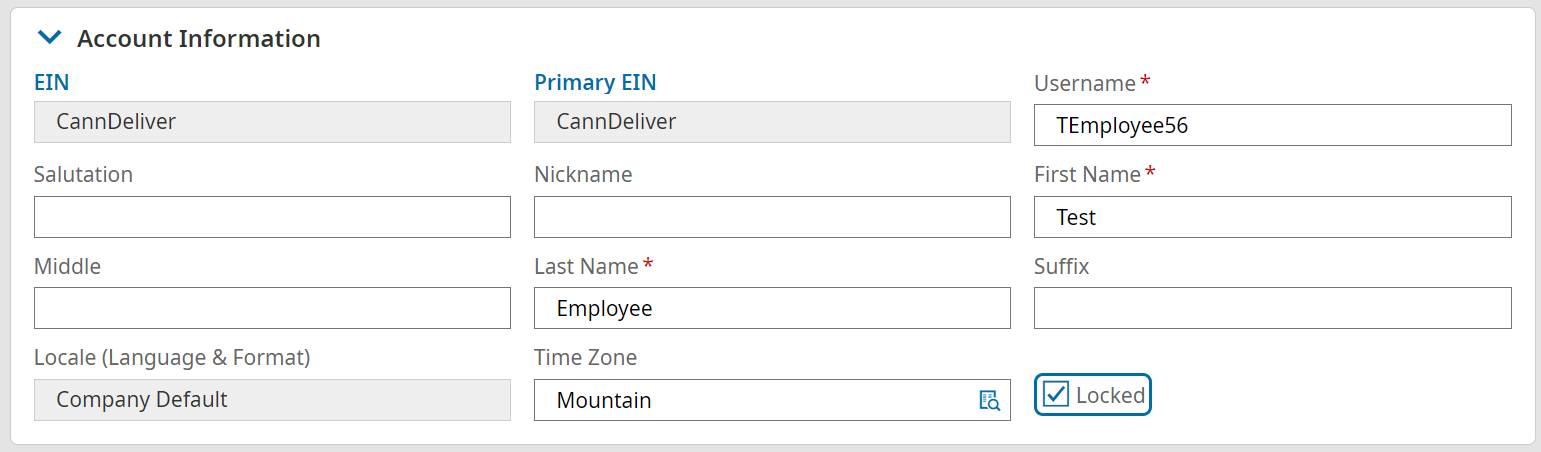
3. Click RESET PASSWORD. This will automatically reset the employee’s password and send an email to the employee with the new temporary password.
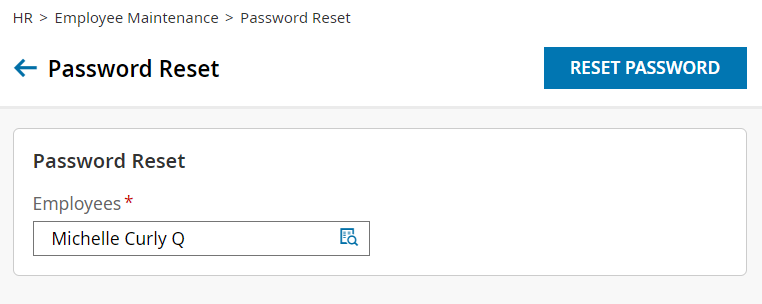
4. If the employee is still having issues logging in, you may need to clear the employee’s virtual code settings. You will do this by navigating to the employee’s profile and selecting the button to clear their virtual code settings. This resets their log in verification to the current email address, phone number, and SSN.
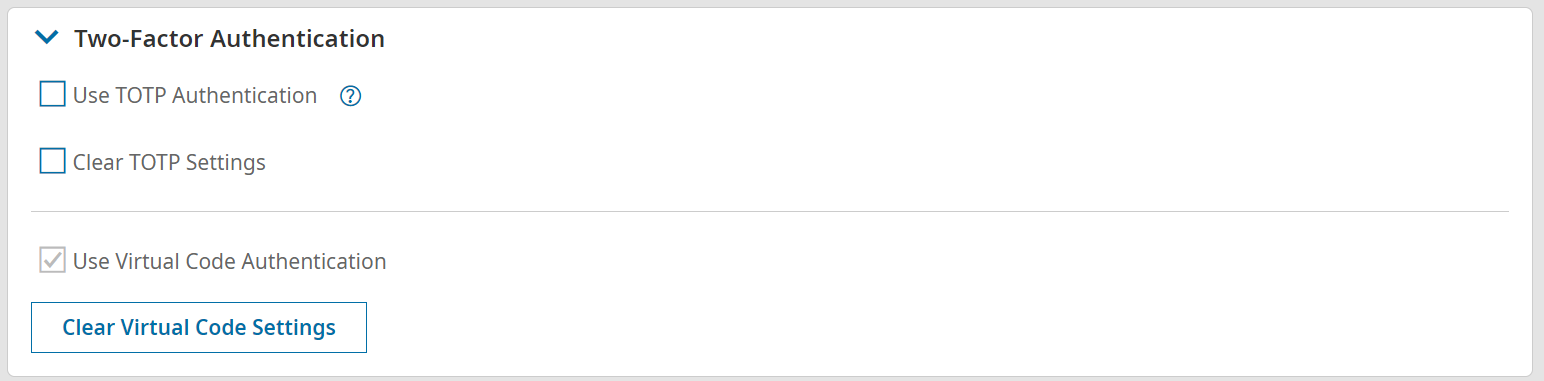
What is an HRIS?
HRIS stands for Human Resource Information System. It is software that centralizes employee data, payroll, benefits, compliance documentation, and workforce management in one platform. For construction companies, a general tool is often insufficient because it does not include the job costing, certified payroll reporting, and field workforce tools the industry requires. Construction-specific HCM platforms layer these capabilities on top of core HR functionality to handle what the construction sector actually demands.
What is the best HR software for construction companies?
The best HR software for construction depends on company size, payroll complexity, and whether the firm runs public work or manages union crews. For mid-to-large contractors with complex compliance needs, Würk is the strongest all-in-one option. Arcoro suits contractors who want a fully construction-native modular platform with deep ERP connectivity. hh2 is the best fit for Sage users who need field-to-financials integration. Procore remains the project management standard but requires HR integrations to cover payroll and compliance. Rippling and Paylocity serve contractors with simpler profiles and primarily office-based workforces. The best hr software solutions align to your compliance footprint, not just your headcount.
When does it make sense to use construction-specific HR software versus a general HRIS?
Any contractor running public work, managing union crews, or operating across multiple states should use software solutions for construction companies. The regulatory complexity in those scenarios goes beyond what general HR tech can configure around. Standard HR tools are a reasonable choice for contractors whose workforce complexity is low, who do not run prevailing wage work, and whose primary HR need is basic administration and benefits management. As soon as public work or union payroll enters the picture, the right HR software is always a construction-native platform.
What is HR in construction?
HR in construction is workforce management across a mobile, compliance-heavy environment covering hiring, payroll, safety documentation, worker classification, and retention across multiple active job sites simultaneously. Construction HR carries regulatory complexity most industries do not face: prevailing wage and Davis-Bacon compliance, union reporting, OSHA recordkeeping, and I-9 verification at scale. It also operates with a workforce that is largely deskless, multilingual, and project-based.
Insights and Innovation
How do Würk integrations work?
Würk’s integrations connect your HR, payroll, benefits, and workforce management data with our trusted third-party partners. Our API syncs data in real time, while secure file and document transfers provide another way to share information. Your team spends less time on manual updates and more time on the work that matters.
What is Würk’s API, and how does it benefit vendors?
Würk’s API lets approved vendors push and pull data securely from our platform. That enables real-time updates and keeps HR, payroll, and workforce data in sync for shared customers. Vendors reduce manual work and support requests, and mutual customers get accurate data in every system they use.
Can vendors upload and transfer documents through Würk’s system?
Yes! Würk enables file and document transfers, allowing vendors to securely exchange essential HR, payroll, and compliance-related files.
How can I integrate my software with Würk?
If you’re a vendor looking to integrate with Würk, simply contact our partnerships team to discuss API access and integration options. Our team will provide guidance on connecting your software to Würk’s platform.
What if my business needs a custom integration?
Würk offers flexible integration options. If your business needs a custom setup, our team will review your requirements, recommend the best approach, and work with you to build a tailored integration, whether that’s an API connection, a scheduled file transfer, or a new partner connection.
How do I get started with Würk integrations?
Businesses can contact our team to review the tools they already use and map out which integrations to turn on. Vendors can reach our partnerships team to discuss API access, file transfer options, and partnership opportunities. Either way, our team guides you through setup and testing so data flows correctly from day one.
What is payroll integration?
Payroll integration connects your payroll system to the other tools that hold employee data, such as HR, time tracking, benefits, retirement, and accounting software. Instead of exporting files and re-entering data, information syncs automatically between systems. That reduces errors, saves time each pay period, and keeps employee records consistent everywhere they appear.
What is HRIS integration?
HRIS integration links your human resources information system with other software your business uses, like payroll, applicant tracking, learning, and benefits platforms. When an employee’s information changes in one place, it updates everywhere else. Würk’s HR and payroll already share one database, and our integrations extend that connected data to third-party tools.
What integrations should HR software support?
At a minimum, HR software should connect to payroll, time and attendance, benefits carriers, retirement plans, and your accounting or general ledger system. Many businesses also need learning management, compensation data, expense management, and identity tools. Würk covers payroll, HR, time, and benefits natively and integrates with partners like Cornerstone, Lattice, Legion, Human Interest, and Entra ID.
How can I automate HRIS and payroll data sharing?
The simplest way is to run HR and payroll on one platform, so there’s nothing to sync. When you need outside tools, use API-based integrations that update records in real time instead of scheduled file uploads. Würk offers both: an all-in-one HR and payroll platform, plus an API and secure file transfers for partner systems.
Insurance
What is Würk Insurance?
How is this different from using a third-party insurance provider?
Payroll and Compliance
How does Würk handle multi-EIN / common paymaster setups?
Würk supports multi‑EIN organizations and IRS‑compliant common paymaster arrangements by allowing multiple entities to operate within a single, centralized payroll platform while maintaining clear compliance boundaries. Each EIN is configured as its own legal employer for tax filing and reporting, but payroll can be managed holistically, making it easier for businesses with shared employees, parent‑subsidiary structures, or growing entity footprints. For common paymaster setups, Würk tracks employee wages across participating EINs and properly applies FICA caps at the employee level, helping prevent duplicate taxation and ensuring accurate Social Security and Medicare calculations.
Employees benefit from a streamlined experience with one consolidated record and correctly issued tax documents, while finance and HR teams retain full visibility through EIN‑level and consolidated reporting, clean general ledger mapping, and audit‑ready records.
What changes when employees work in multiple states?
Each work state can require its own tax registration, unemployment account, leave coverage, minimum wage and overtime application, and wage-statement rules. Accurate work-location tracking in HR and payroll systems, updated whenever an employee’s territory or residence changes, is what keeps this manageable.
Can HR software handle union payroll and collective bargaining agreements (CBAs)?
Not all platforms support union payroll natively. CBA-specific wage rates, trade classifications, overtime rules, and union deductions require a payroll engine built to accommodate those variables. Würk, Arcoro, and hh2 all have native union payroll support. Rippling and Paylocity do not. ADP can handle some union scenarios through configuration, but it is not purpose-built for construction. For contractors managing union crews, verifying CBA support before selecting an HR platform is non-negotiable.
How does construction payroll differ from standard payroll?
Construction payroll involves multiple pay rates, union rules, prevailing wage requirements under Davis-Bacon, certified payroll reporting, multi-state taxes, and job cost allocation. None of these are handled natively by standard payroll tools. The consequences of errors extend beyond employees: misallocated hours distort job costing, and prevailing wage violations can trigger audits or debarment from future federal work under DOL enforcement rules.
What is the biggest compliance risk in multi-state payroll?
The highest-frequency risks are withholding in the wrong state due to stale or missing address data, and missing local tax obligations because payroll was configured to a mailing address rather than a work location. Both are preventable with trigger-based address reviews and a payroll system that validates work location against tax tables before each pay cycle.
How do reciprocity agreements affect payroll withholding?
A reciprocity agreement allows the employer to withhold only for the employee’s home state, rather than the state where work is performed. Reciprocity is not automatic: it requires the employee to file a nonresident exemption certificate with the employer before the treatment applies, and it covers income tax withholding only. SUI obligations continue to follow where the work is performed, regardless of any reciprocity agreement.
What is multi-state payroll?
Multi-state payroll is the process of managing wages, tax withholdings, unemployment contributions, and tax filings for employees who live or work across more than one state. Obligations are triggered by where employees physically perform work, not just where the business is headquartered, which means a single remote hire in a new state can create registration and filing requirements before the first paycheck goes out.
Does Würk integrate with seed-to-sale / POS systems like Dutchie or METRC?
Würk does not currently integrate directly with seed‑to‑sale or POS systems like Dutchie or METRC. However, it can support payroll reporting needs alongside those systems by allowing employers to import or map labor data captured elsewhere into payroll. Time, wages, and job or department information can be aligned with payroll records to ensure employees are paid accurately and compliantly, even when sales, inventory, or production activity is managed in a separate system. This approach gives cannabis businesses flexibility to continue using their preferred seed‑to‑sale or POS tools while maintaining a compliant payroll system tailored to workforce and tax requirements. Würk also continuously evaluates and adds integrated partners, so additional integration options may become available in the future as client needs and technology evolve!
What's the difference between Managed Payroll and the self-service platform?
The primary difference is how hands-on you wish to be! With Managed Payroll Services, Würk’s payroll experts take on the heavy lifting, reducing the administrative burden of payroll processing, giving clients added peace of mind, and freeing up internal time. For businesses that may not have in-house payroll and HR teams or want to outsource, Managed Payroll Services is a great option.
The self‑service platform, on the other hand, gives clients full control to run payroll independently using Würk’s technology, with built‑in tools for calculations, compliance, and reporting. Clients manage their own payroll schedules and submissions, while still having access to Würk support as needed. This option works well for teams that prefer to run payroll in‑house.
Is Würk a PEO or payroll processor?
Würk is a payroll processor, not a PEO. Clients remain the legal employer of record, maintaining full control over their workforce, benefits, and employment decisions. Würk provides the technology and expertise to manage payroll, HR, taxes, and compliance. Unlike a PEO, Würk does not co‑employ workers or take ownership of HR policies; instead, it partners with organizations as a payroll and workforce management provider, offering flexibility and control without the co‑employment model.
How does Würk handle cash-based payroll?
Würk can support cash‑based payroll setups by configuring the client as unbanked within the system, allowing Würk to be used as a payroll calculator and reporting tool rather than a direct payment mechanism. Employers use the platform to calculate wages, taxes, and withholdings accurately, ensuring payroll records and reporting are correct and compliant. Employees are then paid directly in cash by the employer, and the employer remits payroll taxes to the appropriate tax agencies separately.
What types of cannabis companies do you work with?
How does Würk protect employee data?
Protecting employee data is a top priority at Würk. We leverage UKG’s world‑class cloud infrastructure and security framework, a global leader in HCM, to host our platform. We also partner with Arctic Wolf to provide 24/7 security monitoring, threat detection, and incident response. Together with encryption, role‑based access, and other enterprise‑level security controls, this ensures sensitive employee and payroll data stays protected. Finally, for cannabis companies specifically, Würk is the only SOC‑compliant Human Capital Management (HCM) provider built exclusively to support this industry.
What states does Würk operate in?
Würk supports payroll and full tax services across all 50 states and Puerto Rico, covering more than 5,000 local tax jurisdictions nationwide!
How long does implementation take?
Implementation timelines vary based on factors like payroll complexity, number of locations, and system setup. That said, most clients are onboarded in a few weeks, not months. With Würk, you’re supported by a dedicated Project Manager, module‑specific subject matter experts, and data specialists who handle migration, configuration, and testing to ensure a smooth transition without disrupting payroll.
What should I consider when choosing a compliance solution?
Can cannabis businesses customize their solution?
What is METRC and why is it important?
Why choose Würk as my payroll provider?
Can I process payroll without a bank account?
How does 280e affect my cannabis business?
Should I outsource my payroll or use software?
Managed Services
What is Managed Payroll Services?
Managed payroll refers to a comprehensive payroll service that takes the burden of payroll processing off the shoulders of businesses. It includes automating various payroll solutions to ensure that employees are paid accurately and on time while maintaining compliance with local, state, and federal law. Businesses, especially in specialized sectors like the cannabis industry, benefit from these tailored solutions that simplify the complexities of payroll and HR management.
What are the Benefits of Using Managed Payroll Solutions?
Utilizing a payroll provider has numerous advantages, including increased efficiency, reduced risk of errors, and enhanced compliance with tax regulations. By outsourcing payroll processing, businesses can focus on core operations while ensuring that their workforce management is handled by experts in the field. This is particularly important for highly-regualted industries like the hemp industry and the marijuana industry, where the regulatory landscape is constantly evolving.
Who Can Benefit from Managed Payroll Services?
Managed payroll services are beneficial for a wide range of businesses, particularly those in the heavily regulated industries. Whether you’re a small startup or a well-established business, these services help streamline payroll processing and ensure compliance with industry regulations. Additionally, companies that do not have a dedicated human resources team or the internal capacity to manage payroll effectively can greatly benefit from outsourcing this function.
What is Managed Human Resource Services?
Managed HR Services refers to the practice of outsourcing human resources functions to a specialized provider, allowing businesses to focus on their core operations while ensuring compliance and efficiency in HR processes. These are customized solutions that help your business run smoothly.
Why should cannabis businesses consider HR outsourcing?
HR outsourcing can help cannabis businesses streamline their operations, reduce administrative burdens, and ensure compliance with ever-changing regulations, ultimately improving employee satisfaction and productivity. Outsourcing HR helps you focus on the essential aspects of your business without getting bogged down in the details like rules and regulations, background screening, and employee handbooks.
What compliance issues should cannabis businesses be aware of in HR?
Cannabis businesses must navigate various compliance issues including payroll compliance, employment laws specific to the cannabis industry, and maintaining accurate records for the Bureau of Cannabis Control.
What services do you offer for dispensaries looking to improve their HR processes?
We offer a range of services for dispensaries, including payroll and HR management, employee training, compliance guidance, and personalized HR consulting to help optimize your cannabis human resources services. If you need something outside of our managed services, such as applicant tracking, timekeeping software, or employee benefits administration, check out our other software solutions.
What are managed tax registration services?
Managed tax registration services refer to a turnkey service where Würk’s team of tax experts registers your business with state and local tax agencies, secures account numbers, sets up TPA and provider access, and confirms activation so payroll taxes can be filed accurately and on time. Compliance-centric businesses, from cannabis and healthcare to construction and manufacturing, use it to simplify multi-state and local tax registration.
Can my organization handle tax registrations ourselves?
Yes, you can opt to self-register with each state and local agency. If you do, we’ll share guidance on the information each agency needs and how to send us your account numbers, so your payroll tax filings aren’t delayed. You can also switch to managed registration later if your footprint grows.
Who can benefit from managed tax registration services?
Managed tax registration services are beneficial for a wide range of businesses, particularly those in compliance-centric industries. Whether you’re a small startup entering a new local jurisdiction or a well-established business entering new states, these services help streamline year-end tax filings and support compliance. Companies without a dedicated tax team, or without the internal time and expertise to navigate complex agency requirements in states like California, benefit most.
Do I need to register for payroll taxes in a new state?
In most cases, yes. When you hire an employee who works in a new state, you generally need a state withholding account and a state unemployment insurance account before you run payroll there. Some cities, counties, and school districts also require local tax accounts. Missing a registration can lead to penalties, rejected filings, and notices from tax agencies.
How do I register as an employer in a new state?
Each state has its own process, but you’ll usually register online with the state revenue department for withholding and with the state workforce or labor agency for unemployment insurance. You’ll need your FEIN, business details, and the date you first paid wages in the state. With Würk, our tax team completes these registrations for you and confirms the account numbers.
How long does state payroll tax registration take?
Timelines vary by state. Some agencies issue account numbers within a few days of an online application, while others take several weeks, especially for unemployment insurance accounts or local registrations. Würk tracks each registration, monitors agency portals for notices, and emails you account numbers and next steps as soon as they’re available.
Can my payroll provider handle state tax registration?
Some payroll providers only file taxes once you supply account numbers, leaving registration to you. Würk’s Managed Tax Registration Services handle the registration itself, plus third-party administrator and power of attorney access, so we can file on your behalf. The service is billed monthly, based on registrations completed.
Retirement
What is an employer match?
What are the contribution limits?
What investment options are available?
Workforce Management
What Is the Difference Between Workforce Analytics and People Analytics?
Workforce analytics measures workforce-level data: headcount, labor cost, turnover, coverage, and staffing. People analytics centers on individual employee behavior, engagement, and performance. In practice, the terms get used interchangeably, and most platforms do some of both, but the distinction is useful when evaluating tools because the two disciplines draw on different data and answer to different stakeholders.
How Does Workforce Analytics Work?
Workforce analytics is the process of pulling employee data from HR, payroll, and time systems into one place, reconciling it so the totals agree, and then querying it. Reporting comes first, descriptive analysis next, and forecasting only once there is enough clean history to support it. In practice, the work involves less modeling than most people expect and more data hygiene, because workforce analytics uses whatever the source systems recorded and inherits every gap in them.
What Is Workforce Analysis in HR?
Workforce analysis in HR is the examination of workforce composition, cost, and movement to answer a specific question, such as whether a department is understaffed or which roles carry the highest turnover. It is a task rather than a system. Workforce analytics is the capability that makes that analysis repeatable instead of a one-off spreadsheet exercise, which is the main difference between the two terms.
What Is the Difference Between Headcount and Full-Time Equivalent?
Headcount counts people. Full-time equivalent, or FTE, counts the hours those people work expressed as full-time positions, so two half-time employees equal one FTE. The two totals will never tie in a workforce with part-time or seasonal staff, which is most workforces in these industries. Payroll reporting and many compliance filings use FTE rather than headcount, so knowing which one a report is built on matters before anyone acts on it.
Is Workforce Analytics the Same as Employee Monitoring?
No. Workforce analytics measures aggregate workforce data drawn from HR, payroll, and time systems. Employee monitoring tracks individual activity such as keystrokes, application use, and screen time. Conflating the two creates real exposure, because monitoring data is sensitive on its face and carries privacy obligations that aggregate staffing and cost data does not.
How Long Does It Take to Get Useful Output From Workforce Analytics?
Descriptive reporting is available as soon as historical data is loaded and reconciled, which is usually weeks rather than months. Predictive output takes longer because it needs enough clean history to establish a baseline, generally at least four quarters and more if the workforce is seasonal. Any vendor promising predictive value on day one is describing a demo dataset rather than yours.
Do Small Employers Need Workforce Analytics?
The threshold is less about headcount than about complexity. A single-site employer with forty people and one pay rule can run on reports. Add a second location, a second state, variable pay rules, or credentialed roles and manual tracking starts producing answers that disagree with each other. In regulated industries, the compliance driver applies regardless of size, since a twenty-person operator files the same certified payroll and credential documentation as a large one.
Schedule a test drive of our powerful Würk solution!
Let us show you why our clients rave about our comprehensive HR and payroll solution.